
Getting started
BeaChoice runs on one web app for salon owners and managers, usable on a desktop at the front desk or on a phone. This page walks through everything from registration to the first booking.
The Getting started page in the app
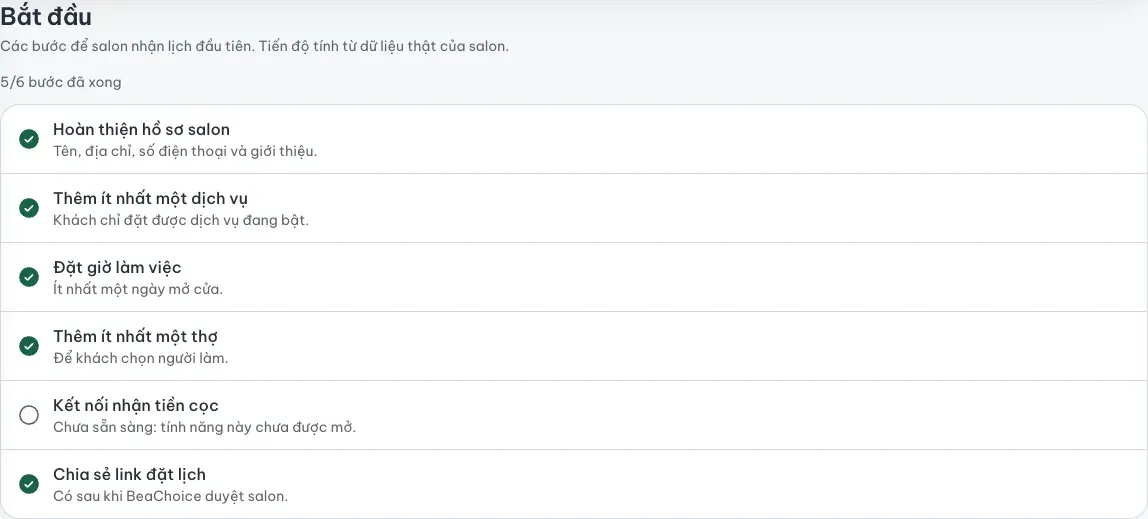
Section titled “The Getting started page in the app”After you sign in and pick a salon, Bắt đầu (Getting started) in the sidebar shows which tasks are done. Progress is computed from the salon's real data, not from a manual checklist. There are six steps:
- Complete the salon profile: name, address, phone number and a short introduction.
- Add at least one service. Customers can only book services that are switched on.
- Set opening hours, with at least one open day.
- Add at least one stylist so customers can choose who does the work.
- Connect deposit payments. This step only shows once online deposits are enabled for your salon. See Accept online deposits.
- Share your booking link. It becomes available after BeaChoice approves the salon.
A step that is not available yet is marked as not ready instead of being ticked off.
Before you start
Section titled “Before you start”- A working email address: the confirmation code is sent there.
- An authenticator app on your phone (Google Authenticator, Microsoft Authenticator or similar) for two-factor sign-in.
- The photos and documents requested during registration.
Suggested order
Section titled “Suggested order”Register and wait for approval, turn on two-factor sign-in, then work through the six steps. If you only have half an hour, finish steps 1 to 4: the salon can then show services and open slots to customers. Online deposits can wait.
The remaining guides are in Vietnamese. Start with the FAQ for short answers.
dau da